WordPress to Webflow Migration Checklist for B2B (2026)

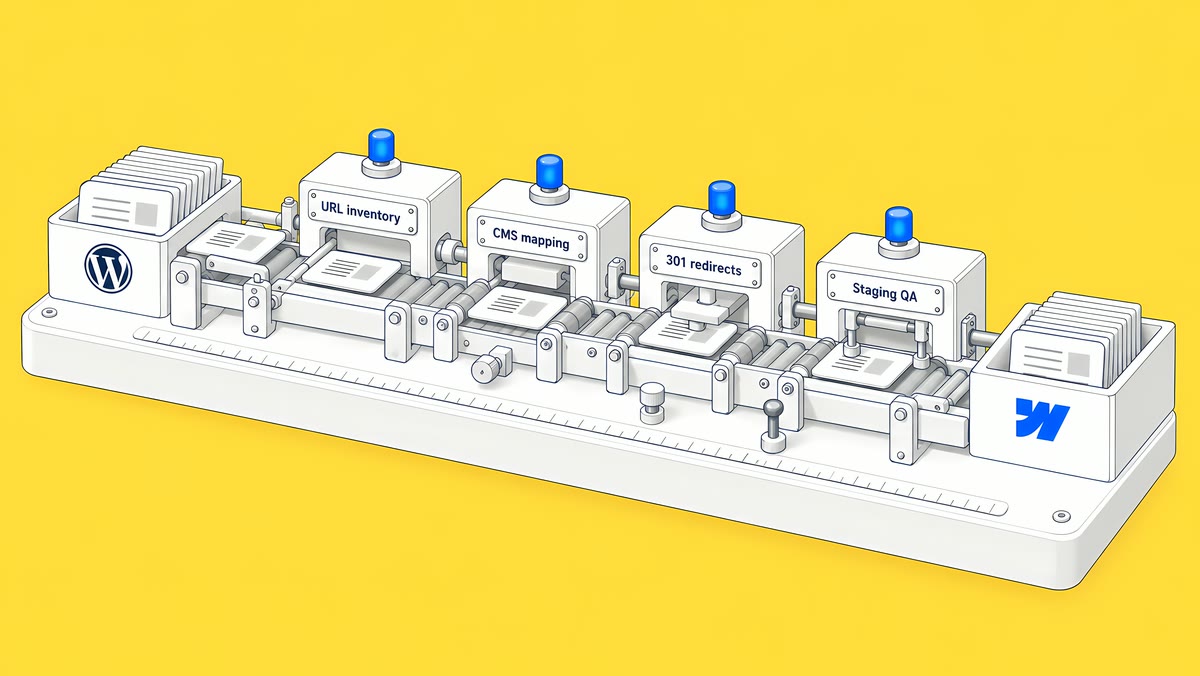
To migrate from WordPress to Webflow and limit SEO risk, crawl and export every URL, rebuild the design and CMS in Webflow, map each old URL to a new one with 301 redirects, keep titles, meta and schema intact, test on staging, then launch and monitor Search Console. Effort and cost depend on how many URLs, templates, CMS items, custom post types and plugins your site has; the cost section below shows how to size yours.
Last updated 15 October 2026.
Migrations rarely fail because of design. They fail because a URL, a redirect or a metadata field was missed and rankings quietly drop. This checklist is the one we follow on website migration projects for B2B teams.
Why migrate from WordPress to Webflow?
B2B teams usually move for four reasons: plugin and security upkeep, slow page speed, marketers waiting on developers for simple edits, and design limits of a theme. On the first of those, according to Webflow's Navigating the WordPress to Webflow migration (June 2025): “It’s recommended to update plugins once a month — two or three times a month for websites with high traffic or critical plugins.” Webflow gives a visual editor, managed hosting and clean code in one place. For a deeper comparison, read our Webflow vs WordPress comparison for B2B SaaS.
What should you do before you migrate?
Which pages and URLs exist today?
Crawl the live site with a crawler such as Screaming Frog and export every indexable URL. Pull the top pages by clicks from Google Search Console and by sessions from analytics. These are the pages you must protect.
What should you record as a baseline?
- Rankings: positions for your 20 to 50 money keywords.
- Traffic: organic clicks and conversions per page for the last 90 days.
- Metadata: title, meta description, H1 and canonical for every page.
- Backlinks: the pages that earn external links, since they need exact redirects.
What is the WordPress to Webflow migration checklist?
- Audit and freeze scope. Decide which pages to keep, merge or retire. Do not publish new WordPress content mid-migration without logging it.
- Design in Figma. Approve layouts first, then build. See our Figma to Webflow service.
- Build the CMS structure. Map WordPress post types, categories, authors and custom fields to Webflow collections and fields.
- Import and clean content. Move posts via CSV or API, then fix headings, internal links, image alt text and embeds.
- Rebuild SEO elements. Carry over title tags, meta descriptions, canonicals, Open Graph tags, schema and the XML sitemap.
- Map redirects. Create a 301 for every old URL that changes. Keep URL structures the same wherever possible.
- Test on staging. Check forms, tracking, responsive layouts, speed and broken links, and block indexing until launch.
- Launch. Switch DNS, publish, confirm the redirects, resubmit the sitemap in Search Console.
- Monitor for 30 days. Watch coverage errors, 404s, rankings and conversions against your baseline.
What drives the cost of a WordPress to Webflow migration?
Webflow's own migration overview is direct about it: “There's no automated way to convert a site from another platform into Webflow.” The same article calls a migration a rebuild, not a transfer: page layouts, styles, CMS structure and interactions are recreated in Webflow, using the old site as the reference. So the cost of a move follows the size and shape of what has to be rebuilt and re-mapped. ActiveSet doesn't publish migration prices; these are the drivers any quote depends on.
| Driver | Where to count it on WordPress | Why it moves the effort |
|---|---|---|
| URLs to keep or redirect | A full crawl, the XML sitemap and the Search Console pages report | Every URL that changes needs a row in the redirect map and a test after launch. Keeping slugs keeps this list short. |
| Unique templates | Distinct layouts: home, service, post, case study, landing page, archive | Each template is designed and built once in Webflow. Pages that share a template are content entry, not new builds. |
| Posts and CMS items | The count per post type in the WordPress admin or export | Content is exported, converted from XML to CSV, imported into Collections and then cleaned: headings, internal links, images and embeds. |
| Custom post types and custom fields | The post types and field groups your theme or plugins add | Each type usually becomes a Collection, and relationships become reference fields. More types and relationships mean more mapping. |
| Static pages | Pages that aren't generated from posts | Webflow's Basic and Premium plans allow 300 static pages. Beyond that, repeating pages move into CMS templates, or the site needs Team (500). |
| Plugins whose features need replacing | The active plugins list | Forms, search, memberships, multilingual and ecommerce each need a native Webflow feature, another tool or a rebuild (see the next section). |
| Integrations | CRM, marketing automation, analytics, consent, chat, scheduling | Each one is reconnected and tested on staging with a real account. |
| Redesign or like-for-like | Your design status | A redesign adds discovery and design rounds. A like-for-like move still rebuilds every template, because no theme imports into Webflow. |
Webflow's WordPress migration article describes the content route: export from WordPress as XML, convert it to CSV, then import the CSV into a Collection and map the fields. It also suggests checking your Site plan's item limit first: Premium includes 20,000 CMS items and 40 Collections (May 2026 plan update).
Before you ask for quotes, count these for your own site and take the same counts to every agency, with the URL list from your crawl; our guide to building a redirect map shows how to turn that list into the redirect file, and our technical SEO launch checklist covers what to verify on launch day.
Which WordPress plugins need a replacement in Webflow?
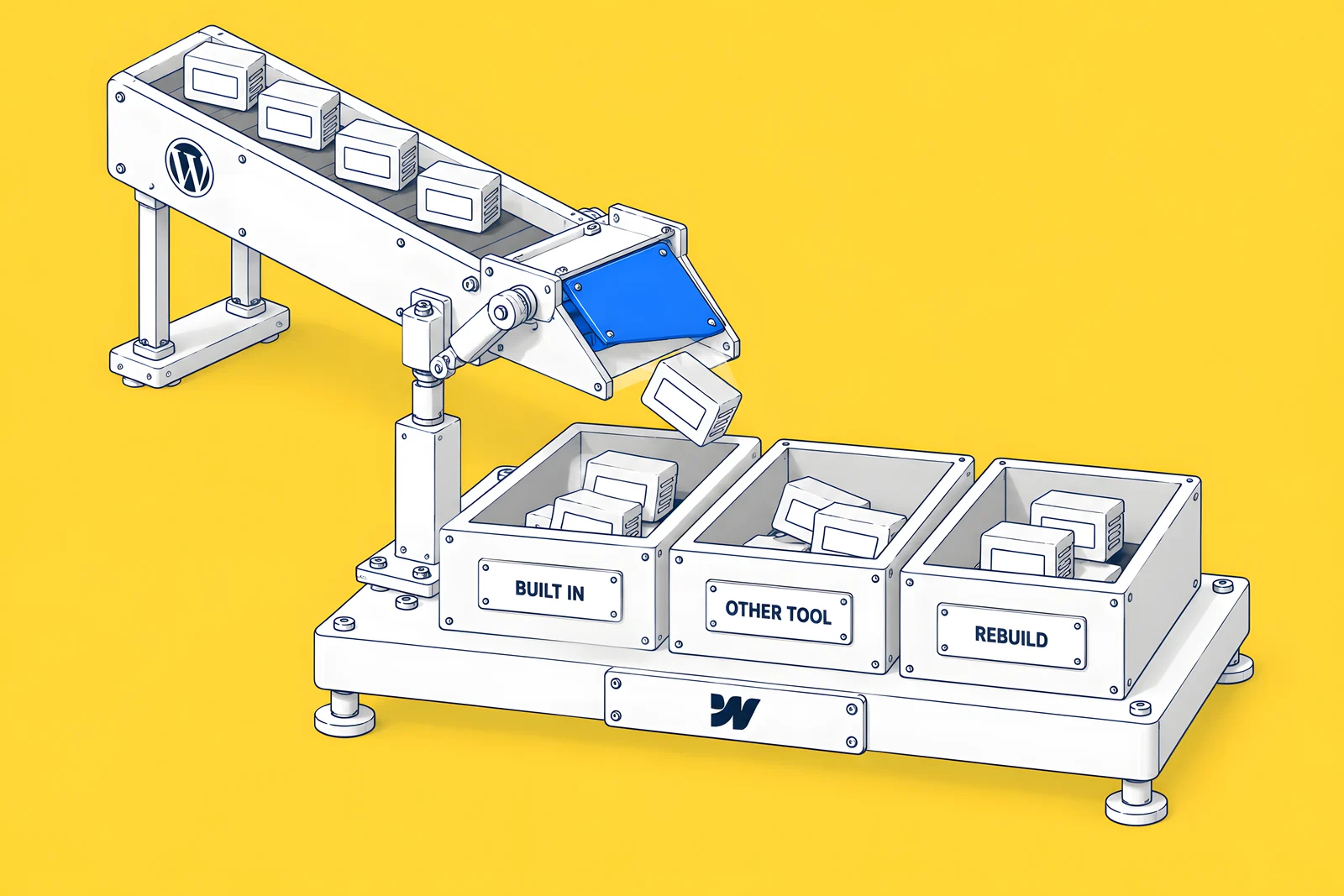
A WordPress site often runs its forms, SEO, search, languages and gated content through plugins. In Webflow, some of those jobs are built in, some need a separate tool and some have to be rebuilt. Sort your active plugins into those three groups before you scope the move.
| Plugin job on WordPress | Webflow route | Group | What to check |
|---|---|---|---|
| SEO titles, descriptions, canonicals, sitemap | Page and CMS SEO settings, canonical tags and an auto-generated sitemap | Built in | Export every title and description and re-enter or import them. |
| Redirects | 301 redirects in Site settings, with CSV import | Built in | Build the full map before launch; see our redirect map guide. |
| Contact forms | Webflow forms, or embedded CRM forms | Built in or another tool | Webflow lists unlimited form submissions on Basic and Premium, and form file uploads on Premium only. For CRM forms, see our guide to Webflow and HubSpot forms. |
| Site search | Webflow site search | Built in (Premium) | Site search is listed on Premium, not on Basic. |
| Multilingual | Webflow Localize, an add-on charged per locale | Built in (add-on) | $9 per locale a month on Essential (up to 3 locales) or $29 on Advanced (up to 10), billed yearly, checked 15 Oct 2026. See our Webflow localization cost guide. |
| Memberships and gated content | A third-party membership tool | Another tool | Webflow sunset its User Accounts feature on 29 January 2026, so gated content now needs a separate tool. |
| Ecommerce | A Webflow Ecommerce Site plan, or a separate store | Built in (separate plan) or another tool | Ecommerce plans are separate Site plans, and Webflow Localize doesn't support Ecommerce Site plan features. |
| Page builders, sliders and animation | Components and Interactions in the Webflow Designer | Rebuild | Treat each custom block as a design and build task. |
| Caching, backups and security plugins | Webflow hosting, with automatic backups listed on its Site plans | Not needed as plugins | Confirm any security requirements your IT team has with Webflow's documentation. |
How do you keep your SEO during the move?
Search engines treat a changed URL as a new page unless a 301 redirect tells them otherwise. The safest approach is to keep the same slugs, then redirect anything that must change one to one, never to the homepage. Google documents site moves and redirects in its Search Central guidance. Add your new sitemap to Search Console on launch day and watch the Pages report for the first weeks. Our SEO service covers this monitoring.
What mistakes break a WordPress to Webflow migration?
- Missing 301 redirects: cause 404s and lost backlink value. Fix with a redirect map from the full crawl.
- Changed slugs: rankings reset. Keep slugs identical.
- Forgotten metadata: titles and snippets change. Export and re-import SEO fields.
- Staging left indexable: creates duplicate content. Noindex staging only.
- No tracking at launch: leaves no data to compare. Test analytics before the DNS switch.
How does ActiveSet run migrations?
ActiveSet is a Webflow Premium Partner based in Bengaluru, India. Our migration method is a full crawl of the old site, one-to-one URL mapping, a 301 redirect map, and an audit before and after launch. In one past project we rebuilt a client's site on Webflow from their Figma files, including a courses CMS migration, 301 mapping and the domain transition. The usual order is discovery, Figma design, the Webflow build, review on staging in Markup.io, then launch. If a revamp comes with the move, see Webflow website redesign and our guide to how long a redesign takes. After launch, maintenance plans keep it healthy.
Disclosure: ActiveSet is a Webflow Premium Partner and earns a commission from Webflow on Webflow plans. The prices in this post are Webflow's own list prices.
Ready to move?
Share your current site and goals, and we will send a migration plan with a redirect strategy. Talk to ActiveSet.
Sources
- Webflow Help Center, Migrate your site to Webflow overview, updated 16 Jul 2026, checked 15 Oct 2026
- Webflow Help Center, Migrate your site from WordPress to Webflow, updated 16 Jul 2026, checked 15 Oct 2026
- Webflow Help Center, Updated pricing and simplified plans for May 2026, updated 31 Aug 2026, checked 15 Oct 2026
- Webflow Help Center, User Accounts sunset, updated 25 Feb 2026, checked 15 Oct 2026
- Webflow Help Center, Manage add-ons, updated 23 Sep 2026, checked 15 Oct 2026
- Webflow Help Center, Webflow Localize overview, updated 29 Sep 2026, checked 15 Oct 2026
- Webflow, Plans & pricing, checked 15 Oct 2026
- Webflow, Navigating the WordPress to Webflow migration, June 2025 (already linked in the post)
Frequently Asked Questions
It depends on the same drivers as cost: how many templates need designing and building, how much CMS content needs importing and cleaning, how many URLs change, and which plugins need replacing. A like-for-like move of a small brochure site is a much shorter project than a redesign with custom post types and gated content. Ask each agency for a dated plan built from your own inventory.
Rankings can move while Google recrawls a moved site, and no one can promise they won't. You reduce the risk by keeping slugs where you can, carrying over titles, descriptions and canonicals, redirecting every changed URL one-to-one with a 301, and monitoring Search Console against a baseline. Record that baseline before launch so you can tell normal movement from a real problem.
Yes. Export posts, map fields to a Webflow collection, import via CSV or API, then clean headings, links and images.
Yes, for every URL that changes. Redirect each old URL to its closest new equivalent, not the homepage.
It depends on scope, and ActiveSet doesn't publish migration prices. The project cost follows the templates, CMS items and custom post types to rebuild, the URLs to redirect and the plugins to replace. Webflow's own fee is separate: the Premium Site plan is $25 a month billed yearly or $39 billed monthly (list price, checked 15 Oct 2026). The cost drivers section above shows how to size your site.


